Dependent Pilgrim
Learn how to manage dependent pilgrims in DooUMS, including children, elderly family members, and individuals who require special assistance during their Umrah journey.
Overview
The Dependent Pilgrim feature in DooUMS allows travel agencies to properly categorize and manage pilgrims who require additional care, assistance, or special arrangements during their Umrah pilgrimage. This includes minors traveling with parents, elderly family members, individuals with medical conditions, or anyone who needs supervision throughout the journey.
Proper dependent pilgrim management ensures compliance with travel regulations, appropriate accommodation arrangements, and enhanced duty of care for vulnerable travelers.
Adding a Dependent Pilgrim
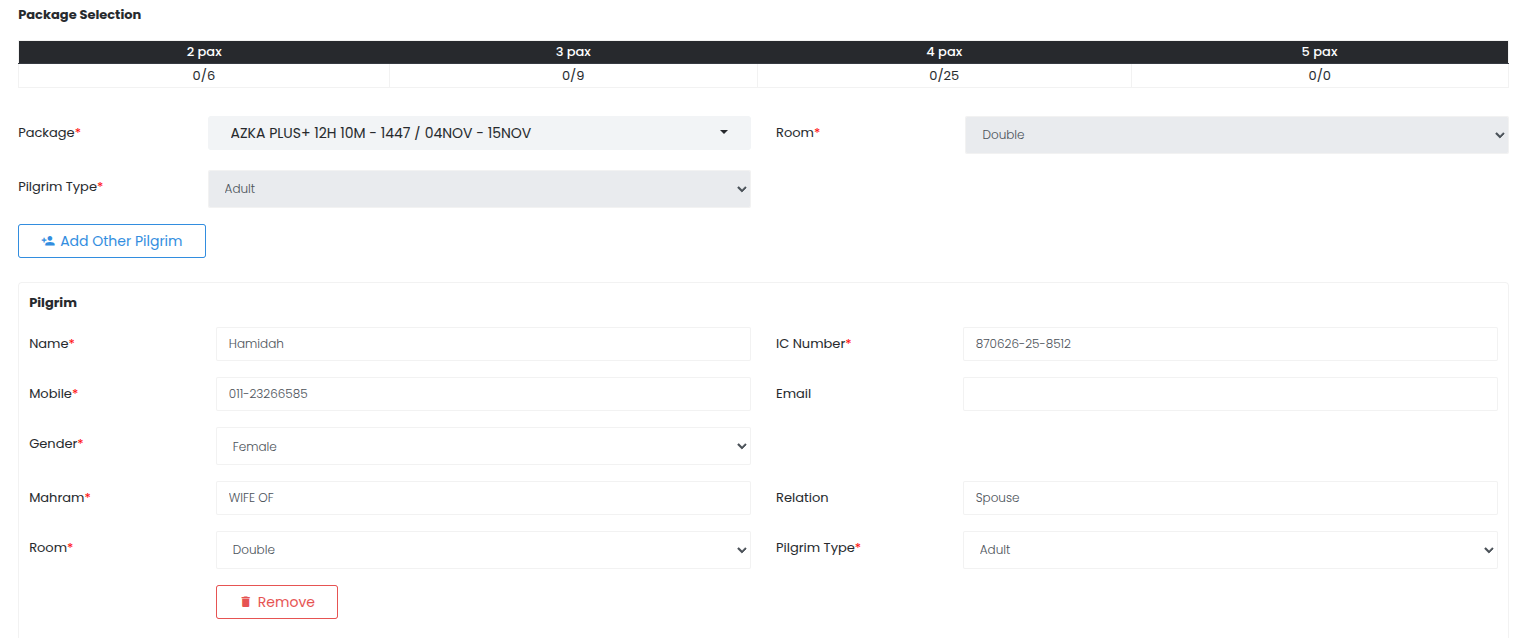
Step 1: Create Main Pilgrim Record
- Navigate to Pilgrims from the main menu
- Click Add New Pilgrim to start a new pilgrim registration
- Fill in all required information for the main pilgrim first:
- Complete personal information (Name, IC Number, etc.)
- Add contact information and emergency contacts
- Enter travel information (passport details, health status)
Step 2: Package Selection
- Select the appropriate Umrah package for the main pilgrim
- Choose room type and pilgrim type
- After completing the package selection, the Add Other Pilgrim button will be enabled
Step 3: Add Dependent Pilgrim
- Click the Add Other Pilgrim button (now enabled after package selection)
- Fill in all required fields for the dependent pilgrim:
- Personal information
- Contact details
- Travel information
- Package and room preferences
Step 4: Add Multiple Dependents (if needed)
- If there are additional dependent pilgrims to add, click Add Other Pilgrim again
- Repeat the process for each dependent pilgrim
- Each dependent will be added to the same booking group
Step 5: Manage Added Pilgrims
- Review all added pilgrims in the booking
- If there's a mistake, click the Remove button next to any pilgrim to delete them from the booking
- The total cost will automatically recalculate showing the latest Total Payable amount
- Verify the final total reflects all pilgrims and their respective packages
The system automatically recalculates the total payable amount whenever you add or remove pilgrims from the booking. This ensures accurate pricing for the entire group.
Dependent Pilgrim Management
Documentation Requirements
For Minor Children
- Birth Certificate: Proof of age and parentage
- Travel Consent: Notarized consent from both parents (if traveling with one parent)
- Passport/Visa: Valid travel documents with appropriate visas
- Medical Records: Vaccination records, medical conditions, allergies
For Elderly Dependents
- Medical Clearance: Doctor's certificate confirming fitness to travel
- Medication List: Complete list of current medications and dosages
- Emergency Contacts: Multiple contact persons in case of emergency
- Insurance Documentation: Travel and medical insurance coverage
For Medical Dependents
- Medical Certificate: Recent medical evaluation and travel clearance
- Treatment Plans: Ongoing medical treatment requirements
- Equipment Needs: Medical equipment or devices required during travel
- Healthcare Provider Contacts: Treating physician and medical team information
Cost Considerations
Pricing Structure
- Child Rates: Reduced rates for children under specific age ranges
- Dependent Discounts: Special pricing for multiple dependents per main pilgrim
- Care Supplements: Additional charges for enhanced care services
- Insurance Premiums: Higher insurance coverage for dependents with special needs
Payment Responsibility
- Main Pilgrim: Primary financial responsibility for all dependent costs
- Shared Costs: Some families may split costs among adult family members
- Sponsored Arrangements: Clear documentation of who is financially responsible