Add Pilgrim
This page provides a comprehensive guide for adding new pilgrim records to the DooUMS system for Umrah pilgrimage management.
Overview
The Add Pilgrim functionality allows travel agencies and tour operators to register new pilgrims for Umrah packages. This process captures all essential information required for travel documentation, accommodation arrangements, and pilgrimage coordination.
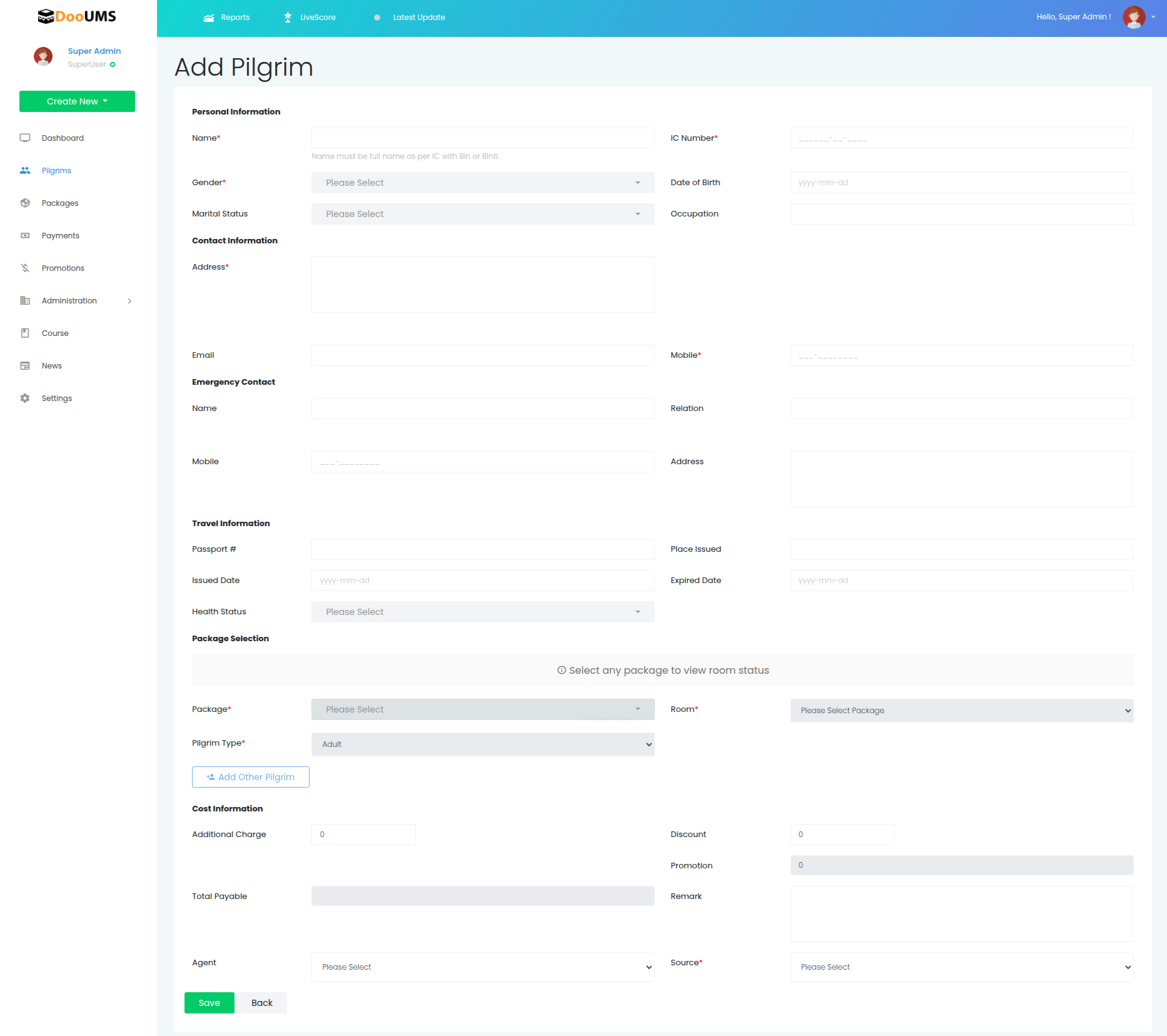
How to Add a New Pilgrim
Follow these steps to successfully register a new pilgrim in the system:
- Access the Add Pilgrim Form: Navigate to the pilgrim management section and click "Add New Pilgrim"
- Complete Personal Information: Fill in all required personal details including name, IC number, and date of birth
- Add Contact Information: Provide address, email, and mobile number
- Enter Emergency Contact: Specify emergency contact details including name, relation, mobile, and address
- Provide Travel Information: Enter passport details, place issued, dates, and health status
- Select Package: Choose the appropriate Umrah package, room type, and pilgrim type
- Add Cost Information: Set additional charges, discounts, promotions, and remarks if applicable
- Assign Agent: Select the agent and source information
- Review and Submit: Verify all information before finalizing the registration
Form Fields Reference
The Add Pilgrim form is organized into the following sections with their respective fields:
Personal Information
- Name* - Full name as per identification documents
- IC Number* - National Identity Card / Citizen Number
- Gender - Male/Female selection
- Date of Birth - Pilgrim's date of birth
- Marital Status - Single, Married, Widowed, or Divorced
- Occupation - Current occupation or profession
Contact Information
- Address* - Complete residential address
- Email - Valid email address for communication
- Mobile* - Primary contact mobile number (with country code)
Emergency Contact
- Name - Emergency contact person's full name
- Relation - Relationship to the pilgrim (e.g., spouse, parent, sibling)
- Mobile - Emergency contact's mobile number
- Address - Emergency contact's address
Travel Information
- Passport # - Passport number
- Place Issued - Country/location where passport was issued
- Issued Date - Passport issue date
- Expired Date - Passport expiration date
- Health Status - Current health condition and any medical considerations
Package Selection
- Package* - Select the Umrah package
- Room* - Room type and accommodation preference
- Pilgrim Type* - Category of pilgrim (e.g., adult, child, infant)
- Add Other Pilgrim - Button to add additional pilgrims to the same booking
Cost Information
- Additional Charge - Any extra charges applicable to the pilgrim
- Discount - Discount amount or percentage applied
- Promotion - Promotional offers applied to the booking
- Total Payable - Final calculated amount to be paid
- Remark - Additional notes or comments about the booking
Agent Information
- Agent - Travel agent handling the booking
- Source - Source of the booking (referral, walk-in, online, etc.)
Required Fields
Fields marked with an asterisk (*) are mandatory and must be completed before submitting the form.
Cost Calculation
The Total Payable amount is automatically calculated using the formula:
Total Payable = Package Cost + Additional Charge - Discount - Promotion
- Package Cost: Base price of the selected Umrah package
- Additional Charge: Extra services or special requirements
- Discount: Manual discount applied by agent
- Promotion: Promotional offers or campaign discounts