Interface Guide
A comprehensive walkthrough of the DooUMS Packages interface, explaining all features and navigation options available to administrators.
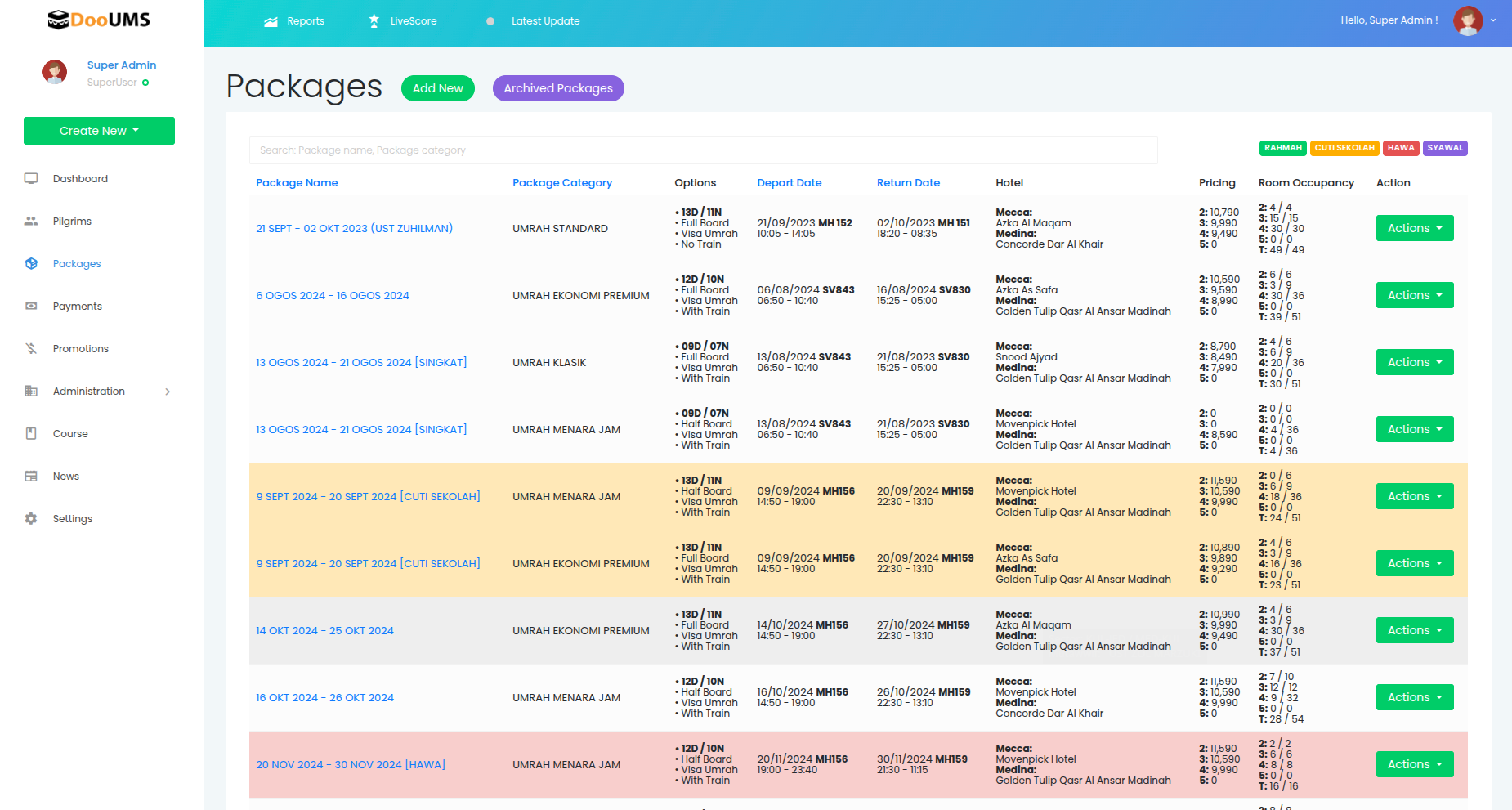
Main Packages Dashboard
Navigation and Access
- Main Menu Access: Navigate to Packages from the main DooUMS menu
- Dashboard View: The system displays all active packages in a structured table format
- Quick Actions: Access Add New and Archived Packages buttons at the top
Search and Filter Options
Package Search
- Location: Top of the packages page
- Functionality: Filter packages by name or category
- Use Cases: Quickly locate specific packages or groups of packages
- Search Tips: Use partial names or keywords for broader results
Search Examples:
- "UMRAH STANDARD" - finds all standard packages
- "SEPT 2024" - finds packages for September 2024
- "HAWA" - finds all ladies group packages
Package Table Structure
The main table provides a comprehensive overview of all packages with the following columns:
Column Descriptions
| Column | Information Displayed | Interactive Features |
|---|---|---|
| Package Name | Full package title with dates and organizer | Click to view details |
| Package Category | Type classification (Standard, Premium, etc.) | Color-coded display |
| Options | Duration and travel options summary | Shows days/nights and special features |
| Depart Date / Return Date | Complete travel schedule with flight times | Full date and time information |
| Hotel | Accommodations in Makkah and Madinah | Hotel names and categories |
| Pricing | Room prices by occupancy type | Quad, Triple, Double, Single rates |
| Room Occupancy | Capacity tracking per room type | Total/remaining room counts |
| Action | Administrative action menu | Dropdown with management options |
Color Coding System
Packages are visually organized using color tags for quick identification:
Color Tag Legend
- 🟡 Yellow: Cuti Sekolah (School Holiday packages)
- 🩷 Pink: Hawa (Ladies Group packages)
- 🟣 Purple: Syawal (Eid/Seasonal packages)
- 🟢 Green: Standard or General packages
- 🟠 Orange: Custom or special category packages
Color Tag Assignment
Color tags are manually assigned during package creation and can be updated through the edit function.
Action Menu Options
Each package row includes an Actions dropdown menu providing comprehensive management options:
Primary Actions
View Package
- Function: Display complete package details in read-only format
- Use Case: Review package information without editing capabilities
- Access Level: Available to all administrators
Edit Package
- Function: Open package form for modifications
- Use Case: Update pricing, dates, hotels, or any package component
- Caution: Verify no active bookings are affected before major changes
Clone Package
- Function: Create duplicate of existing package
- Use Case: Reuse successful configurations with new dates or minor variations
- Benefit: Saves time when creating similar packages
Management Actions
Archive Package
- Function: Move package to archived list
- Use Case: Remove from active listings while preserving data
- Data Retention: All package and booking history maintained
Delete Package
- Function: Permanently remove package from system
- Use Case: Complete removal of package data
- Restriction: Only available for packages with no booking records
Quick Access Features
Rooming Setup Shortcut
- Makkah Hotel Rooming: Direct link to Makkah accommodation setup
- Madinah Hotel Rooming: Direct link to Madinah accommodation setup
- Function: Configure pilgrim room assignments
- Benefit: Streamlined access to rooming management
Real-Time Data Features
Room Occupancy Updates
The interface displays live capacity information:
Capacity Display Format
Room Type: [Booked/Total Available]
Example: Triple: 15/25 (15 rooms booked, 10 remaining)
Automatic Updates
- Real-Time Sync: Updates automatically with pilgrim bookings
- Capacity Tracking: Shows remaining availability for each room type
- Visual Indicators: Different colors or formatting for full/available rooms
Package Status Indicators
Active Package Indicators
- Green Status: Package is active and available for booking
- Booking Counter: Shows current booking levels
- Availability Status: Indicates if package is full or accepting bookings
Inactive Package Indicators
- Gray Status: Package is inactive or archived
- Limited Actions: Reduced action menu options for inactive packages
Navigation Tips
Efficient Package Management
Quick Search Techniques
- Use the search bar for rapid package location
- Sort by columns to organize view (date, category, etc.)
- Filter by color tags to focus on specific package types
Bulk Operations
- Select multiple packages for bulk actions (where available)
- Use consistent naming for easier searching and organization
- Leverage cloning for efficient package creation
Interface Shortcuts
Keyboard Navigation
- Use Tab to navigate between interface elements
- Enter to open selected packages
- Escape to close modal windows or forms
Mouse Operations
- Right-click for context menus (where available)
- Hover for additional information tooltips
- Double-click for quick access to edit mode
Mobile and Responsive Features
Mobile Interface Adaptations
- Responsive Design: Interface adapts to different screen sizes
- Touch-Friendly: Buttons and controls optimized for touch interaction
- Simplified View: Key information prioritized on smaller screens
Tablet Optimization
- Column Adjustment: Table columns reorganize for optimal viewing
- Touch Actions: Action menus work smoothly with touch navigation
- Data Visibility: Essential information remains accessible
Troubleshooting Interface Issues
Common Display Problems
Package Not Appearing
- Check if package is marked as active
- Verify search filters are not limiting results
- Confirm package creation was completed successfully
Data Not Updating
- Refresh the page to sync latest data
- Check internet connection for real-time updates
- Verify user permissions for data access
Action Menu Not Working
- Ensure sufficient user privileges
- Check for conflicting browser extensions
- Try alternative browsers if issues persist
Performance Optimization
For Large Package Lists
- Use search and filtering to reduce displayed results
- Consider archiving old packages to improve load times
- Regular browser cache clearing for optimal performance