Payment Verification
Learn how to verify and approve payment transactions to ensure accuracy and maintain financial integrity in DooUMS.
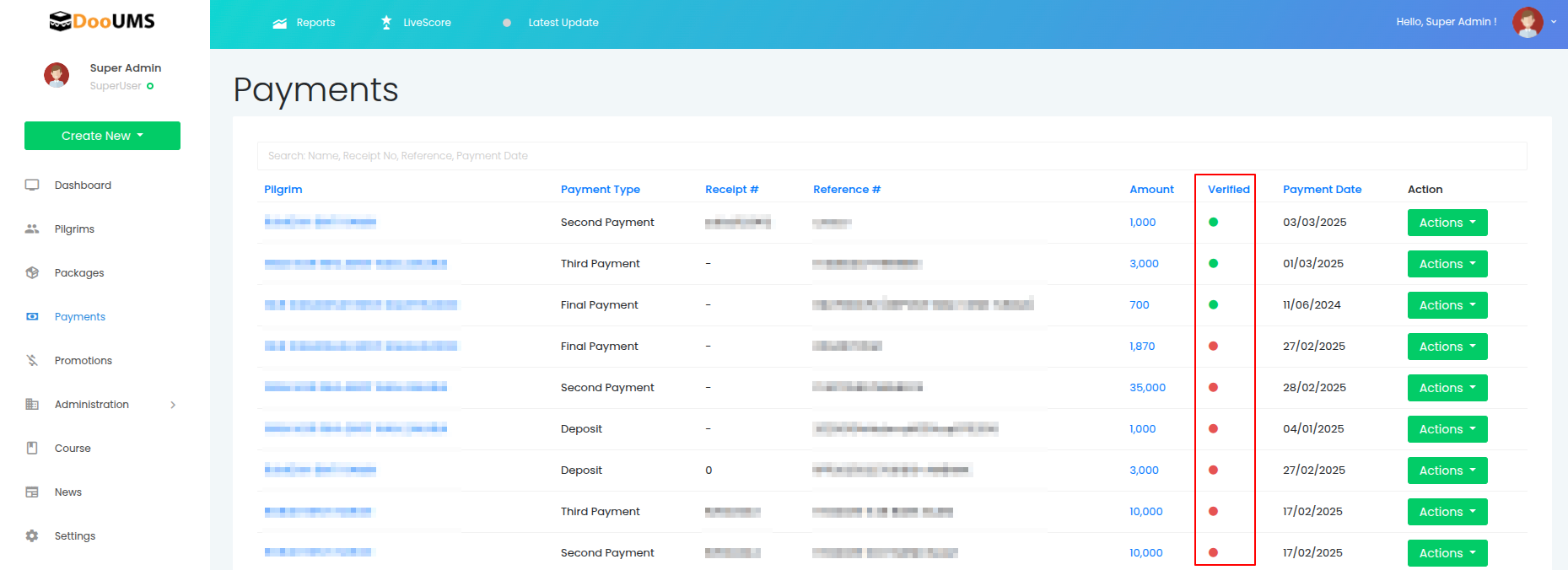
What is Payment Verification?
Payment verification is the process of confirming that recorded payments match actual bank evidence and transaction documentation. This critical step ensures:
- Financial Accuracy: Payments match bank statements
- Audit Compliance: Verified records for regulatory requirements
- Reporting Integrity: Only confirmed payments in official reports
- Fraud Prevention: Detection of discrepancies and errors
Verification Status Indicators
🔴 Not Verified (Red Dot)
- Status: Awaiting verification
- Meaning: Payment recorded but not yet confirmed
- Action Required: Review and verify against bank evidence
- Reporting: Excluded from official financial reports
🟢 Verified (Green Dot)
- Status: Confirmed and approved
- Meaning: Payment validated against bank documentation
- Action Required: None (complete)
- Reporting: Included in all financial reports
Step-by-Step Verification Process
1. Locate Payment for Verification
- Navigate to the Payments page
- Identify payments with red verification dots
- Use search/filter if needed to find specific payments
- Prioritize by date or payment type as required
2. Access Payment Details
- Click Actions → Edit for the payment row
- The payment edit form will open
- Review all entered information:
- Pilgrim name and details
- Payment type and amount
- Receipt and reference numbers
- Payment date and remarks
3. Gather Supporting Evidence
Before verification, collect:
Bank Documentation
- Bank transfer confirmations
- Deposit slips or receipts
- Online banking screenshots
- Bank statement entries
Internal Documentation
- Counter receipt copies
- Cash counting records
- Authorization documents
- Pilgrim communication records
4. Perform Verification Checks
Amount Verification
- ✅ Confirm exact amount matches bank record
- ✅ Check currency and decimal places
- ✅ Verify no calculation errors
Reference Verification
- ✅ Match reference number to bank transaction
- ✅ Confirm transaction date alignment
- ✅ Validate bank/branch information
Pilgrim Verification
- ✅ Confirm payment from correct person
- ✅ Verify pilgrim registration status
- ✅ Check payment type appropriateness
5. Complete Verification
-
If all checks pass successfully:
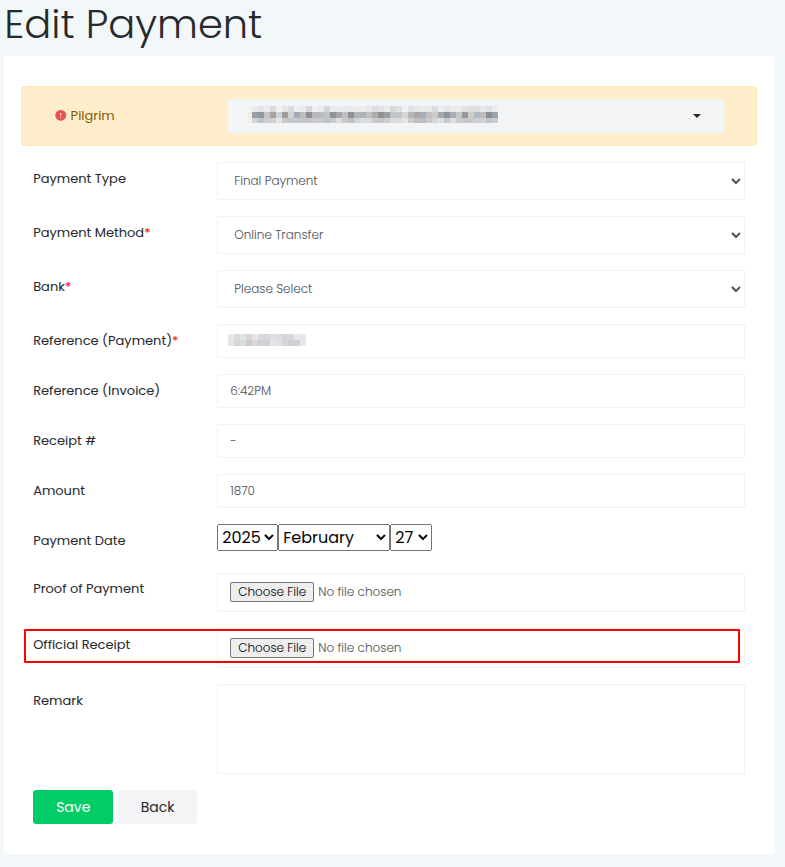
- Generate official receipt
- Add verification comments to remarks if required
- Select generated official receipt for upload
- Submit
-
Expected Result:
- Verification dot changes from red to green
- Payment marked as verified in system
- Official receipt is attached to the payment record
- Timestamp and verifier recorded (if configured)
Verification Scenarios
Scenario 1: Bank Transfer Verification
Payment Details:
- Reference:
15022025 13:33 CASH DEPOSIT CIMB - Amount: RM 3,150
- Date: 2025-02-15
Verification Steps:
- Open bank statement or online banking
- Locate transaction matching reference number
- Confirm amount, date, and account details
- Check pilgrim authorization (if required)
- Mark as verified if all details match
Scenario 2: Counter Cash Verification
Payment Details:
- Reference:
COUNTER-20250215-14:30 - Amount: RM 1,500
- Date: 2025-02-15
Verification Steps:
- Review cash counting sheet for that time
- Confirm receipt was issued to pilgrim
- Check cash register/drawer reconciliation
- Verify staff member authorization
- Mark as verified if documentation complete
Verification Best Practices
✅ Do's
Documentation Standards
- Always verify against original bank evidence
- Maintain copies of verification documents
- Record verification date and officer name
- Add explanatory comments for unusual transactions
Quality Control
- Double-check high-value payments
- Verify payment type matches package agreement
- Confirm pilgrim authorization for payments
- Cross-reference with registration details
Audit Preparation
- Keep verification evidence organized
- Document any corrections or adjustments
- Maintain verification logs
- Ensure traceability for audit trails
❌ Don'ts
Verification Shortcuts
- Don't verify without bank evidence
- Don't batch-verify without individual checks
- Don't verify based on pilgrim confirmation alone
- Don't skip verification for small amounts
System Integrity
- Don't verify if any discrepancies exist
- Don't modify payments after verification without documentation
- Don't remove verification status without proper authority
- Don't ignore verification workflow procedures
Handling Verification Issues
Discrepancy Resolution
Amount Mismatch
- Investigate: Check for data entry errors
- Verify: Confirm with bank and pilgrim
- Action: Edit payment record or create adjustment
- Document: Record resolution in comments
Reference Number Issues
- Check: Verify reference format and source
- Contact: Reach out to bank for clarification
- Alternative: Use bank statement reference if different
- Update: Modify reference field with correct information
Date Discrepancies
- Analyze: Check for processing delays or timezone differences
- Clarify: Confirm actual transaction date with bank
- Adjust: Update payment date if necessary
- Note: Document reason for date change
Escalation Process
When to Escalate
- Unexplained amount differences
- Missing bank documentation
- Fraudulent transaction suspicions
- System verification errors
Escalation Steps
- Document the specific issue clearly
- Gather all available evidence
- Contact supervisor or finance manager
- Follow organizational escalation procedures
- Maintain payment in unverified status until resolution
Verification Reporting
Daily Verification Tasks
- Review all new payments from previous day
- Verify against bank statements received
- Generate verification status reports
- Document any pending verifications
Monthly Reconciliation
- Ensure all payments for the month are verified
- Cross-reference with complete bank statements
- Resolve any outstanding discrepancies
- Prepare verification summary reports
Next Steps
After mastering payment verification:
- Learn Payment Editing for handling corrections
- Review Troubleshooting for common verification issues
- Explore Search and Filtering to efficiently manage payment records